APM sample rate vs. Adaptive Sampling Target: the quiet cost killer
Datadog's APM pricing is driven by ingested spans. To keep that under control without engineers manually tuning sample rates forever, Datadog offers Adaptive Sampling: you set a target volume (or let the intelligent default manage it), and Datadog's agent-side sampler adjusts the effective sample rate to stay near that target. It's a good feature. It also assumes it's the only thing setting the sample rate — and in a lot of real deployments, it isn't.
Two places a sample rate can live
Trace sampling can be configured in more than one place at once: a value baked into a build artifact (a flag set in a Dockerfile, a default in application config) and a value set at runtime through an environment variable in your orchestrator (ECS task definition, Kubernetes manifest, whatever you're running). These two configuration surfaces are usually owned by different people, updated at different times, and — critically — not always in agreement about which one wins.
This is a completely ordinary config-drift failure mode, the same shape as any other "which layer actually took effect in production" bug. The difference with tracing is that the failure mode isn't a crash or a 500 — it's a bill. If the environment variable that was supposed to bring sampling down never actually overrode the hardcoded default, you don't find out from a monitor. You find out from ingestion volume that quietly runs several times higher than intended, month after month, until someone finally cross-references the Adaptive Sampling Target against what's actually landing in the usage data.
In one investigation, APM ingestion was running at 334% of a contracted 300GB budget — with the entire overage landing on on-demand billing, because nothing in the pipeline was actually enforcing the intended rate.
Retention filters make it worse, quietly
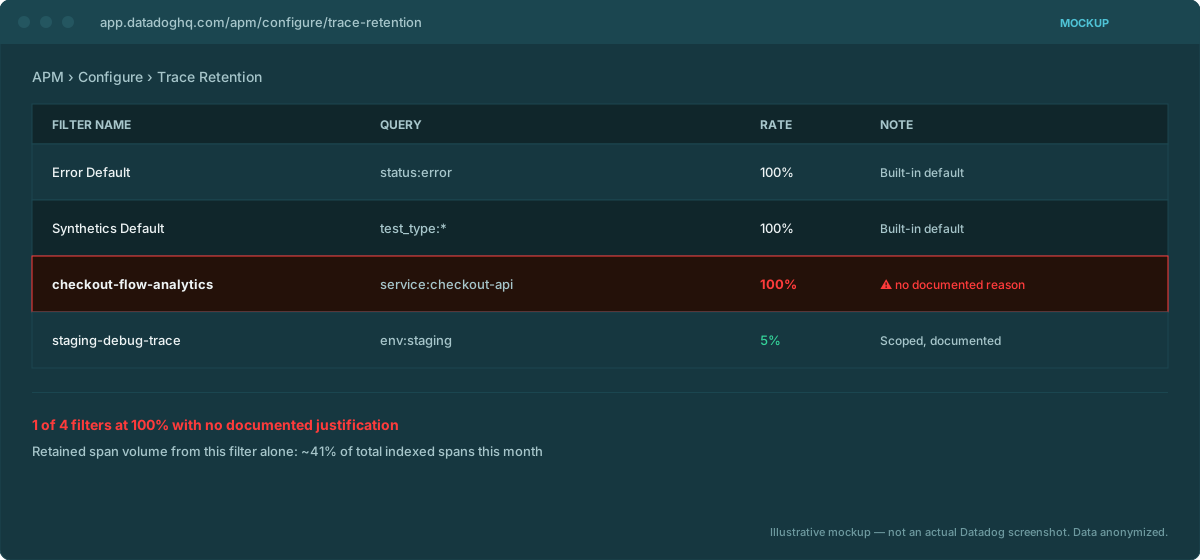
Sample rate controls how many spans get ingested. Retention filters control how many of those ingested spans get indexed for search and analytics — a second, independent cost lever. A retention filter left at its default 100% rate compounds a sampling mismatch: you're not just ingesting more spans than intended, you're also indexing all of them, unfiltered. We cover this specific check in more depth in the retention filters post, but it's worth flagging here because the two problems tend to show up together — nobody revisited either setting since initial rollout.
How to actually check this
Two API calls, cross-referenced:
- Retention filter config —
GET /api/v2/apm/config/retention-filtersreturns every configured filter, including the built-in defaults, with each filter's rate. A rate of1(100%) on a filter with no documented justification is the flag. - Actual ingestion volume —
GET /api/v2/usage/hourly_usagewithfilter[product_families]set to the spans family, compared against your Adaptive Sampling Target and your contracted/committed volume. If actual usage is running meaningfully above target, the sampler isn't doing what you think it's doing somewhere upstream.
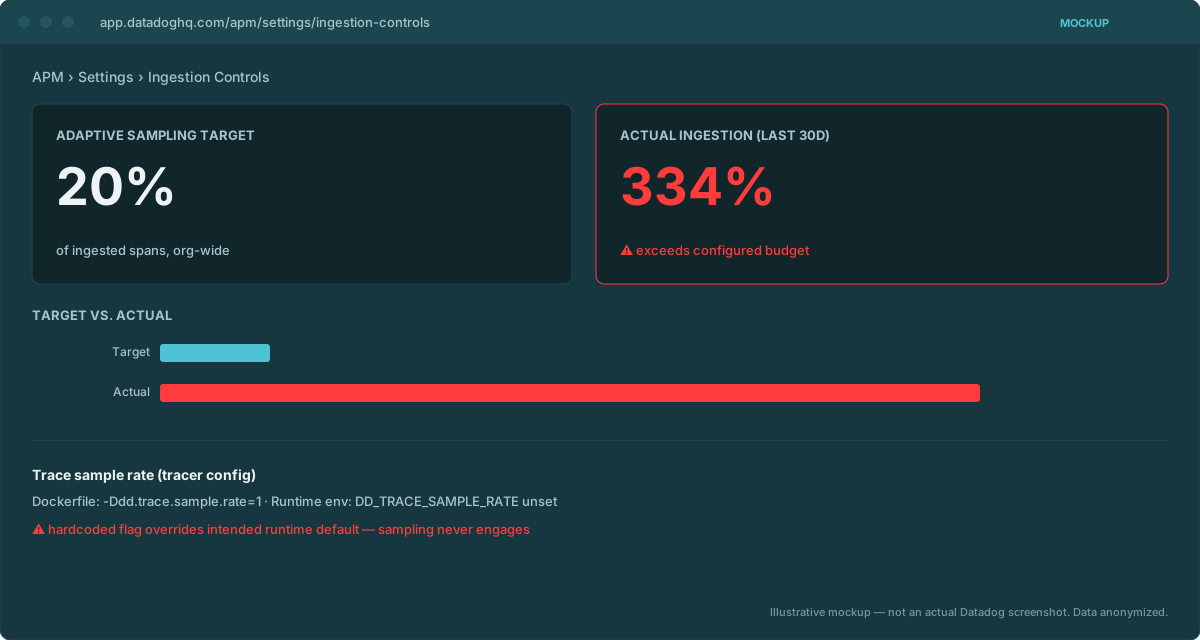
The API itself won't tell you why the two disagree — that's a config-archaeology exercise across your build pipeline and your runtime environment. But it will tell you, unambiguously, that they disagree, and by how much, which is the part that's actually hard to notice from inside the invoice.
What "fixed" looks like
Once the actual override path is confirmed, the fix is usually mechanical: align the Adaptive Sampling Target with what you actually intend to ingest, remove the conflicting hardcoded value so there's one source of truth, and drop the retention filter rate to something deliberate for services that don't need 100% span retention (error and synthetics traffic usually still warrant near-100%; routine request traffic usually doesn't).
DDCostControl runs exactly this cross-reference automatically — Adaptive Sampling Target against actual ingestion, retention filter rates against documented justification — as part of its v1 detection checklist, self-hosted against your own org.
Email us — arena@wagoe.com